
Mobile Repair Near Me: Complete Guide to Common Phone Problems
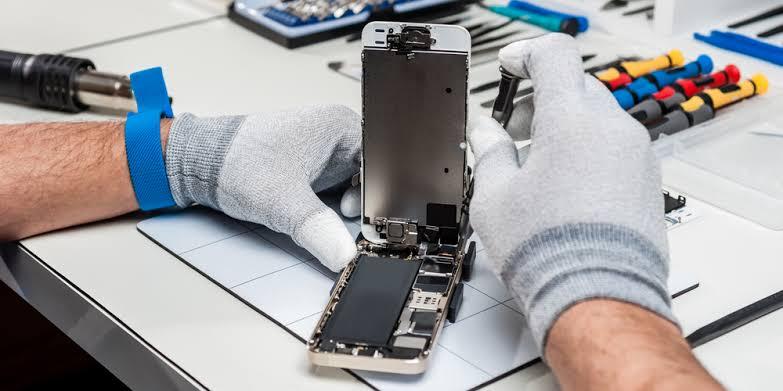
A mobile phone is an important part of everyday life. People use their smartphones for calls, messages, online payments, work, navigation, and entertainment. When a phone stops working properly, even simple daily tasks can become difficult.
Problems such as cracked screens, weak batteries, charging failures, and software errors can affect almost any smartphone. Some issues can be solved with basic troubleshooting, while others require professional attention.
If you are searching for mobile repair near me, understanding common phone problems can help you identify the issue and choose a suitable repair service. In this guide, we will explain the most common mobile phone problems, their possible solutions, and what to consider before arranging a repair.
1. Cracked or Broken Mobile Screen
A cracked screen is one of the most common reasons people look for phone repair services. Accidental drops, pressure, and impacts against hard surfaces can damage the display.
Sometimes, the phone continues to work despite cracked glass. In other cases, the screen may show black spots, coloured lines, flickering, or touch problems.
If the glass is broken, avoid pressing the damaged area. Sharp edges can injure your fingers, and additional pressure may make the damage worse.
For minor software-related display issues, restarting the phone may help. However, a physically damaged screen usually requires professional inspection and may need replacement.
Before approving the repair, ask whether the problem affects only the glass or the complete display assembly. The correct solution depends on your phone model and the extent of the damage.
2. Mobile Battery Draining Quickly
Does your phone lose battery power faster than usual? You may notice that you need to charge it several times a day, even when you are not using it heavily.
Battery drain can result from background applications, high screen brightness, software activity, or normal battery ageing.
Start by checking your phone's battery usage settings. Close unnecessary applications, reduce brightness when appropriate, and install available software updates.
If the battery continues to drain quickly, the battery itself may have lost capacity.
A repair technician can assess the battery and determine whether replacement is necessary. If your phone becomes unusually hot or the battery appears swollen, stop using and charging it and seek professional assistance.
3. Phone Not Charging Properly
Charging problems can prevent you from using your phone when you need it most. Your device may charge slowly, disconnect repeatedly, or fail to recognise the charger.
The cause may be a damaged cable, unsuitable adapter, debris inside the charging port, a worn battery, or a hardware fault.
First, check your charging cable and adapter for visible damage. If possible, try compatible, undamaged accessories.
Inspect the charging port without inserting metal objects or applying liquids. If the connection remains unreliable, avoid forcing the cable into the port.
Persistent charging problems may require professional diagnosis. A technician can check the charging port, battery, and internal charging components before recommending a repair.
4. Mobile Phone Overheating
A phone can become warm during video calls, gaming, navigation, or other demanding activities. However, repeated overheating during normal use should not be ignored.
Possible causes include intensive applications, direct sunlight, charging problems, software issues, or internal hardware faults.
Close demanding applications and move the phone away from direct sunlight. Avoid leaving it inside a parked car, especially during hot weather.
If the device becomes excessively hot, disconnect it from the charger if safe and allow it to cool naturally. Do not put it in a refrigerator or use ice to cool it.
If overheating continues, professional inspection can help identify the cause and determine whether a repair is needed.
5. Phone Freezing or Running Slowly
A smartphone that freezes or responds slowly can make everyday tasks frustrating. Applications may take longer to open, the keyboard may lag, or the phone may restart unexpectedly.
Common causes include limited storage space, too many background processes, outdated software, and application conflicts.
Try restarting your phone and checking how much storage space remains available. Remove unnecessary downloads and applications after confirming that you no longer need them.
You should also check for compatible software updates.
If the phone continues freezing after these steps, the problem may involve its software or hardware. A technician can help determine whether further troubleshooting or repair is appropriate.
6. Water Damage and Liquid Exposure
Liquid exposure can cause serious problems for smartphones, even if the device initially appears to work normally.
After contact with water or another liquid, you may notice charging problems, unusual screen behaviour, distorted sound, or unexpected shutdowns.
If your phone gets wet, disconnect it from any charger and switch it off if you can do so safely. Remove accessories and gently dry the outside with a soft cloth.
Do not charge the phone while it may still be wet, use a hair dryer, or place it in rice. These methods may cause additional problems or delay proper treatment.
Arrange professional inspection as soon as possible, particularly if the phone contains important data. Continued use can increase the risk of further damage.
7. How to Choose the Right Mobile Repair Shop
When searching for mobile repair near me, do not choose a service provider based only on price or convenience.
Look for a repair shop that explains the problem clearly and provides an estimate before starting the work.
Here are some useful points to consider:
-
Repair experience: Choose a provider familiar with your phone brand and model.
-
Clear pricing: Ask for the total cost, including parts and labour.
-
Replacement part quality: Confirm which parts will be used and whether they are compatible with your device.
-
Repair warranty: Ask whether the repair includes a warranty and what it covers.
-
Data privacy: Explain if your phone contains sensitive personal or business information.
-
Estimated completion time: Confirm how long the repair is expected to take.
A reliable repair service should explain the available options without promising results that cannot be guaranteed.
8. What to Do Before Taking Your Phone for Repair
Preparing your phone before handing it over can make the repair process easier.
If the device is working and safe to use, back up your photos, contacts, messages, and important files. You may be able to use cloud storage or a computer, depending on your phone and settings.
Explain the problem clearly. Mention when it started, whether the phone was dropped, and whether it has been exposed to liquid.
Ask whether the technician needs the device unlocked for testing and what privacy precautions are available. Follow the manufacturer's guidance for protecting sensitive information, and do not share account passwords unnecessarily.
If the phone has a swollen battery or signs of serious physical damage, avoid handling it more than necessary and seek professional guidance.
9. Where to Find Mobile Repair Services in Dubai
If you are looking for mobile repair near me in Dubai, consider a repair provider that can assess your device and explain the appropriate solution.
istoredubai offers Apple device repair services in Dubai, including iPhone repair support. If you use an iPhone, you can contact the team to ask about screen damage, battery issues, charging problems, and other repair needs.
Before approving a repair, confirm the cost, replacement part details, estimated turnaround time, and warranty conditions. If you use an Android phone or another brand, check whether the provider supports your particular model.
Choosing a service that understands your device can help you avoid unnecessary repairs and make a more informed decision.
Conclusion
Mobile phone problems can affect communication, work, and everyday activities. Cracked screens, battery drain, charging failures, overheating, and software issues are common reasons people seek repair services.
Basic troubleshooting can resolve some minor problems, but persistent faults and physical damage may require professional attention. Backing up your data, choosing compatible replacement parts, and checking warranty terms can also help you make a better repair decision.
When searching for mobile repair near me, focus on experience, clear pricing, suitable parts, and reliable service. With the right diagnosis and proper care, you can keep your smartphone working well and reduce the risk of future problems.

 English
 Arabic
 French
 Spanish
 Portuguese
 Deutsch
 Turkish
 Dutch
 Italiano
 Russian
 Romaian
 Greek